Router Observability
The Kthena router exposes three complementary observability surfaces:
- Prometheus metrics for alerting, dashboards, and capacity analysis
- When enabled, one access-log record for each
/v1/*request - Loopback-only configuration-dump and pprof endpoints for live diagnosis
This guide describes the current router binary and the Helm defaults. Commands
assume the release is installed in kthena-system; substitute the actual release
namespace when it differs.
Endpoint map
The Helm chart uses three listeners. Health routes remain on the inference listener, metrics use a dedicated pod listener, and debug routes use a separate loopback-only listener.
| Listener | Default | Endpoints | Exposure |
|---|---|---|---|
| Router | Container port 8080; Service port 80 | /healthz, /readyz, inference APIs | The kthena-router LoadBalancer Service |
| Metrics | Container and Service port 9090 | /metrics | The kthena-router-metrics ClusterIP Service and pod network |
| Debug | localhost:15000 | /debug/config_dump/*, /debug/pprof/* | Pod loopback only; no Service port |
The metrics path is fixed at /metrics. Set
networking.kthenaRouter.metrics.port to change its port. Metrics are not served
on the public inference listener unless
networking.kthenaRouter.metrics.exposeOnRouterPort is explicitly enabled for
legacy compatibility.
The dedicated metrics listener binds to all pod interfaces and serves unauthenticated plain HTTP, even when TLS is enabled on the inference listener. A ClusterIP limits exposure outside the cluster but is not an authorization boundary. Use a NetworkPolicy when metrics must be restricted to monitoring workloads.
Verify the listeners
First, confirm that the router and both Services exist:
kubectl get -n kthena-system \
  deployment/kthena-router \
  service/kthena-router \
  service/kthena-router-metrics
Then start each required port-forward in a separate terminal. These commands bind to local loopback by default:
# Dedicated metrics listener.
kubectl port-forward -n kthena-system service/kthena-router-metrics 9090:9090

# Debug listener. Port-forwarding reaches localhost inside the selected pod's
# network namespace even though no Kubernetes Service publishes this port.
kubectl port-forward -n kthena-system deployment/kthena-router 15000:15000

# Inference listener, for health checks without using the LoadBalancer address.
kubectl port-forward -n kthena-system service/kthena-router 8080:80
The examples below assume the chart's default ports. If
networking.kthenaRouter.metrics.port or
networking.kthenaRouter.debugPort was changed, use the configured remote port
in the corresponding port-forward.
Metrics
The tables below list every Kthena-owned router metric family registered by the
current binary. Histograms additionally expose Prometheus _bucket, _sum, and
_count series. Standard Go runtime, process, and Prometheus handler metrics are
also present; those collector-provided families can vary with dependency
versions.
Some metrics appear only after the corresponding feature or request path has been exercised.
Configure Prometheus scraping
The chart creates the kthena-router-metrics Service but does not install a
Prometheus Operator dependency or create a ServiceMonitor. If Prometheus
Operator is already installed, the repository provides an optional example:
kubectl get customresourcedefinition servicemonitors.monitoring.coreos.com

# From the repository root, first update the namespace and labels in this file
# to match your Kthena release and Prometheus serviceMonitorSelector.
kubectl apply -f examples/observability/router-servicemonitor.yaml
The example selects the Service's named metrics port and /metrics path. If
Prometheus runs without the Operator, configure its Kubernetes service discovery
to scrape that same port and path. In either case, verify the target in
Prometheus and check the endpoint directly when discovery fails:
curl --fail --show-error --silent http://localhost:9090/metrics \
  | grep '^kthena_router_active_requests '
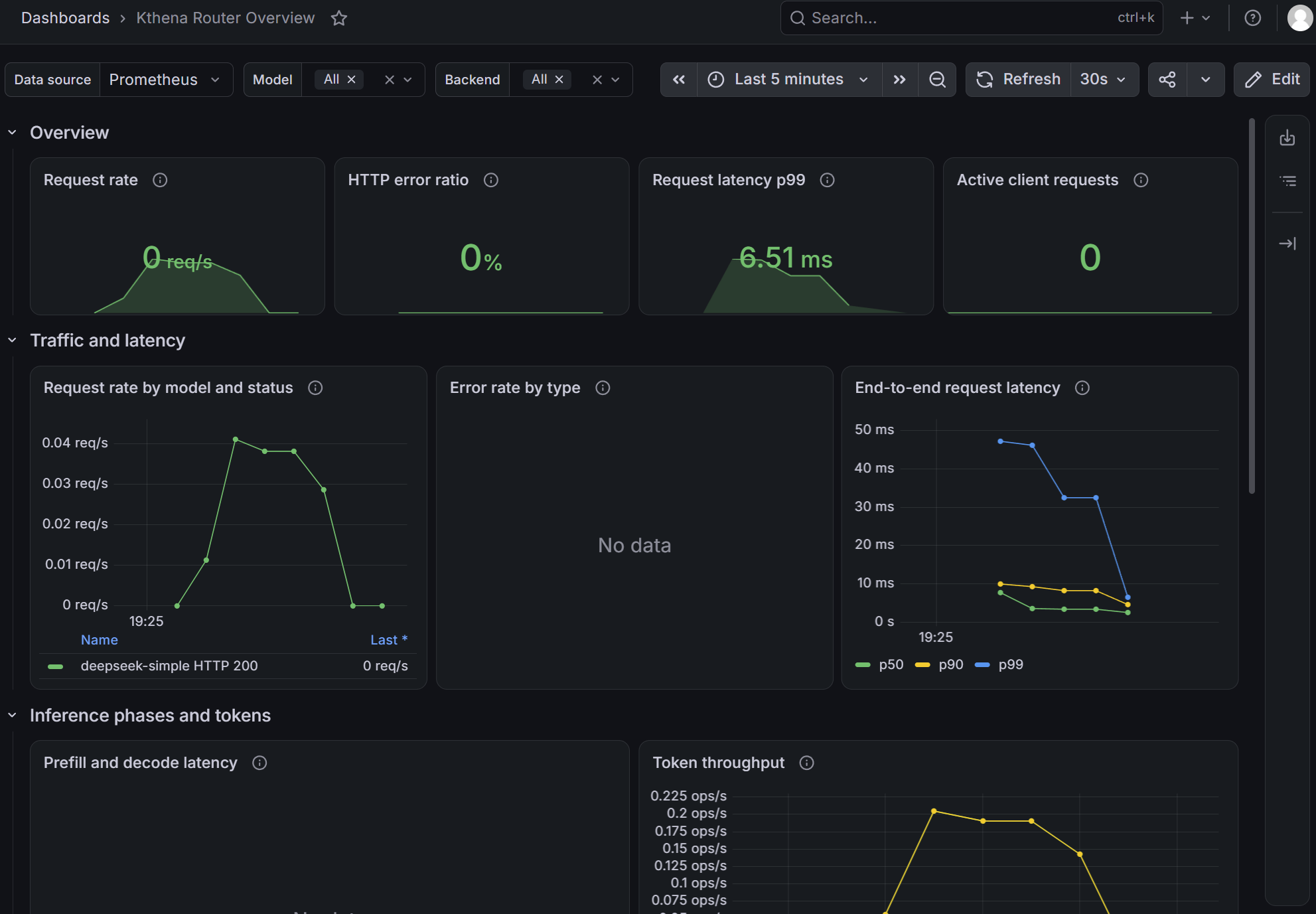
Grafana dashboards
Import
examples/observability/kthena-router-overview-dashboard.json
into Grafana and select the Prometheus data source that scrapes the Router. The
dashboard provides the primary operational view of request traffic, errors,
latency, prefill and decode phases, token throughput, concurrency, queues, rate
limits, and routing failures.
The backend-load panel displays active upstream requests. It is not a saturation percentage because the Router does not know each backend's capacity. Combine it with runtime-specific capacity or utilization metrics when diagnosing backend saturation.
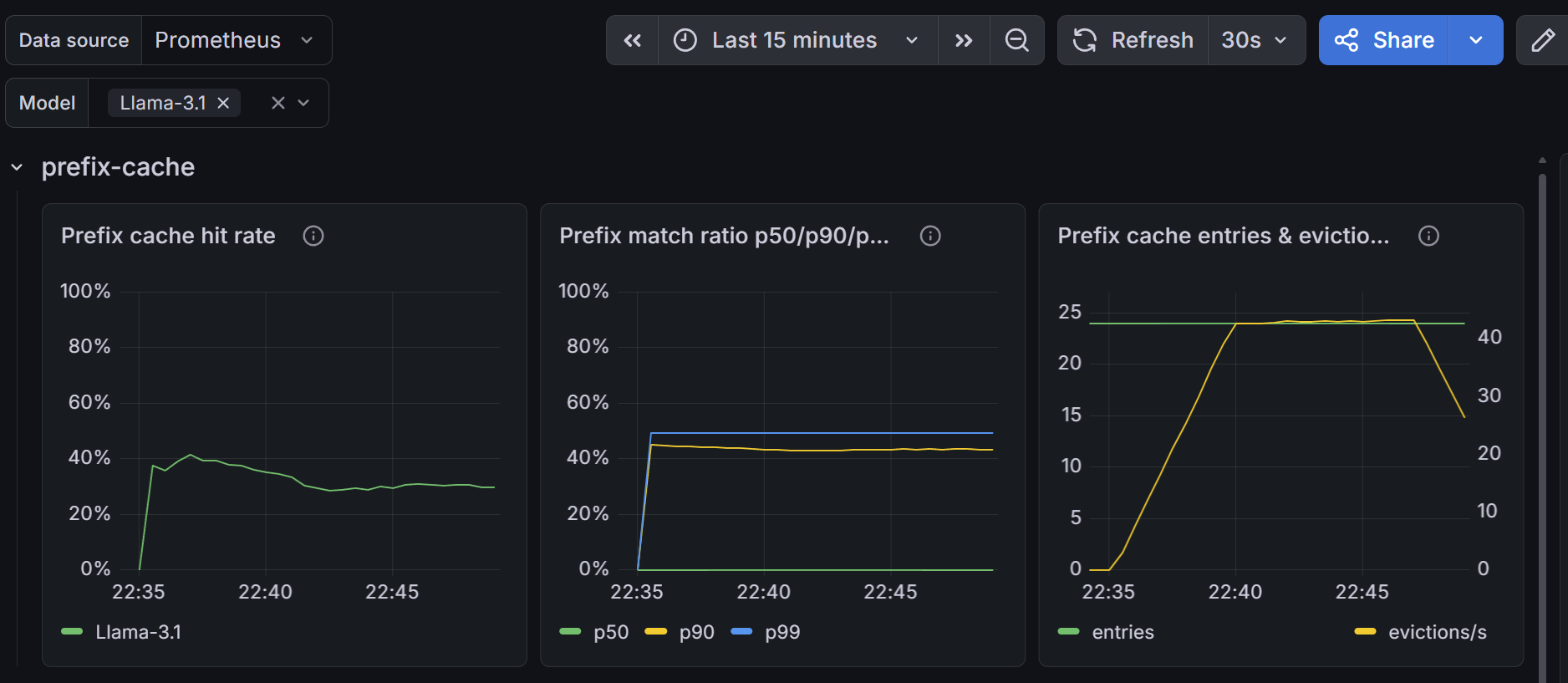
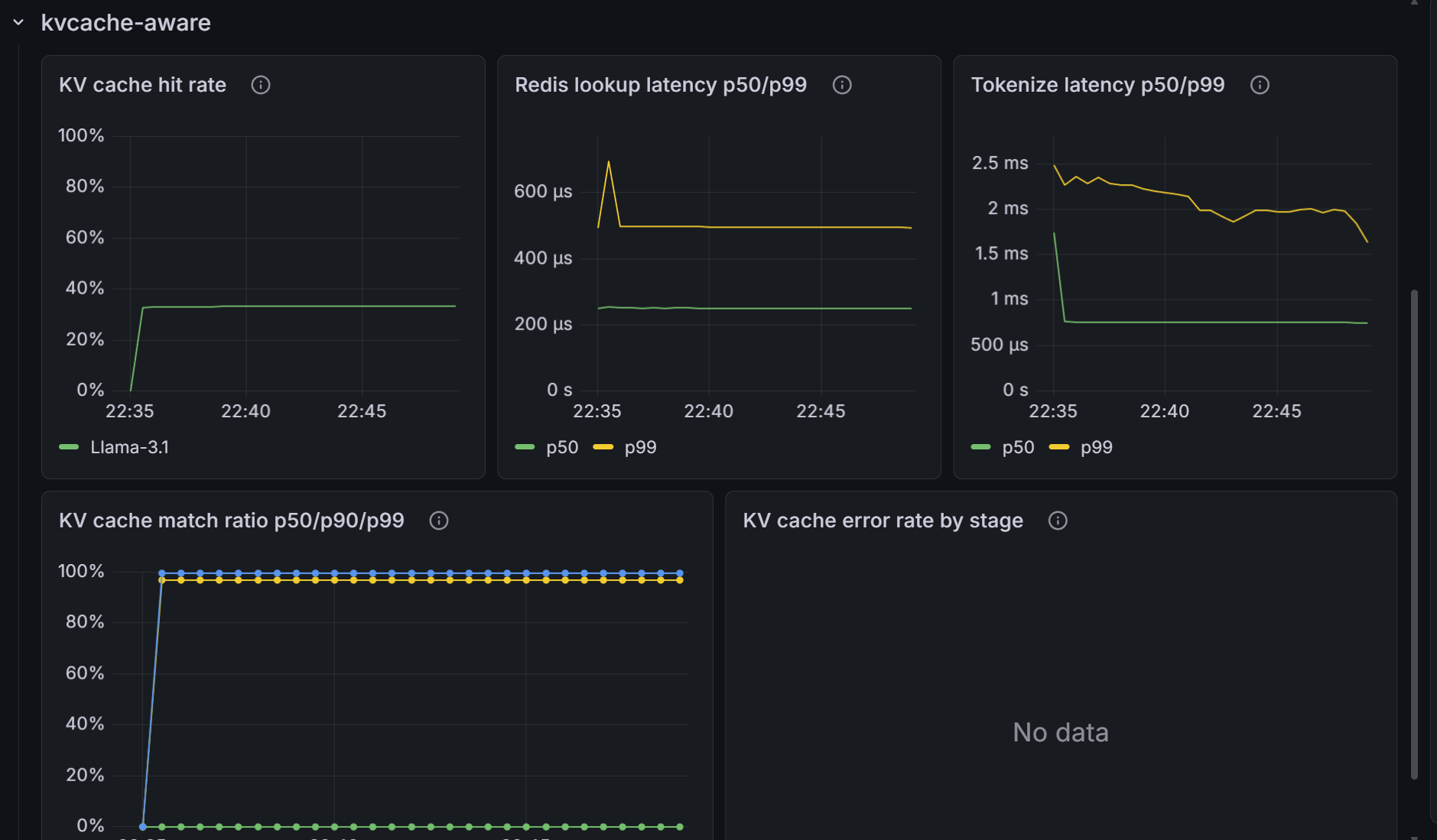
The cache-aware score-plugin dashboard remains a separate specialist view at
examples/observability/kthena-router-score-plugins-dashboard.json.
Requests, traffic, and rate limiting
| Metric | Type | Labels | Description |
|---|---|---|---|
kthena_router_requests_total | Counter | model, path, status_code, error_type, model_route, backend_type, backend_name, upstream_model | Completed authenticated inference requests whose body and model field were parsed |
kthena_router_request_duration_seconds | Histogram | model, path, status_code, model_route, backend_type, backend_name, upstream_model | Handler latency after body and model parsing for those recorded requests |
kthena_router_request_prefill_duration_seconds | Histogram | model, path, status_code | Prefill latency for prefill/decode-disaggregated requests |
kthena_router_request_decode_duration_seconds | Histogram | model, path, status_code | Decode latency for prefill/decode-disaggregated requests |
kthena_router_tokens_total | Counter | model, path, token_type, model_route, backend_type, backend_name, upstream_model | Input or output tokens; token_type is input or output |
kthena_router_rate_limit_exceeded_total | Counter | model, limit_type, path | Requests rejected by input-token, output-token, or request rate limits |
kthena_router_active_requests | Gauge | none | Requests currently inside the inference handler, including parse failures and model-list requests |
kthena_router_active_downstream_requests | Gauge | model | Active inference requests after the body and model field were parsed |
kthena_router_active_upstream_requests | Gauge | model_server, model_route, backend_type, backend_name, upstream_model | Active router-to-backend requests |
The request counter and duration histogram are created only after authentication
and after the request body and model field have been parsed. They therefore
exclude authentication rejections, parse failures, and GET /v1/models; use
access logs or HTTP-layer telemetry when those requests must be counted. The
model label is the requested model when the router's store recognizes it and
unknown otherwise. The path label is the URL path without the query string.
Input token values come from the Router's pre-dispatch tokenizer and are also used for input rate limiting. Output token values use upstream-reported usage when it is available. For external providers, the input value may differ from billing usage because tokenizers, system prompts, and cache accounting vary by provider.
Destination labels use values from resolved routing configuration:
backend_typeismodel_server,external_provider,inference_pool,unresolved, ornone.model_routeandbackend_nameusenamespace/name;nonemeans the label does not apply.upstream_modelis the model sent to the backend. Without a backend override, it is the requested model. LoRA requests use the matched adapter name.model_serverremains onkthena_router_active_upstream_requestsfor compatibility and isnonefor other backend types.
Scheduler and user-fairness queue
| Metric | Type | Labels | Description |
|---|---|---|---|
kthena_router_scheduler_plugin_duration_seconds | Histogram | model, plugin, type | Scheduler plugin execution time; type is filter or score |
kthena_router_fairness_queue_size | Gauge | model, user_id="_all" | Pending requests in the fairness queue, aggregated across users |
kthena_router_fairness_queue_duration_seconds | Histogram | model, user_id="_all" | Time spent waiting in the fairness queue, aggregated across users |
kthena_router_fairness_queue_cancelled_total | Counter | model, user_id="_all" | Requests cancelled or timed out while queued, aggregated across users |
kthena_router_fairness_queue_dequeue_total | Counter | model, user_id="_all" | Requests successfully dequeued, aggregated across users |
kthena_router_fairness_queue_inflight | Gauge | model | Requests admitted through the fairness semaphore |
kthena_router_fairness_queue_priority_refresh_total | Counter | model | Dequeue-time priority refresh and reinsert operations |
kthena_router_fairness_queue_heap_rebuild_total | Counter | model | Full heap rebuilds caused by priority drift |
Raw user identifiers are deliberately not exported. The user_id label is
fixed to _all, keeping cardinality bounded and avoiding exposure of user
identity through the metrics endpoint.
Label compatibility and cardinality
Current router versions include model_route, backend_type, backend_name,
and upstream_model on request, request-duration, and token metrics. They also
include destination labels on kthena_router_active_upstream_requests. When
upgrading from a version without those labels, Prometheus starts new time series;
old counter series do not continue under the new label set.
Update dashboards, alerts, recording rules, and tests that match an exact label set. To reproduce the previous aggregate view, sum over the destination labels:
sum by (model, path, status_code, error_type) (
  rate(kthena_router_requests_total[5m])
)
Destination labels come from resolved routing configuration and fixed enums;
metrics never include request IDs, Secret names, error text, or raw user IDs.
The path label does come from the request URL path, however, so routes with
unbounded dynamic path segments can create unbounded series. Cardinality also
grows with the product of models, routes, backends, upstream models, status
codes, and error types. Normalize dynamic paths before they reach the router or
drop/relabel them at scrape time, and estimate the remaining combinations for
clusters with many routes or long retention.
Tokenizer and cache-aware scheduling
| Metric | Type | Labels | Description |
|---|---|---|---|
kthena_router_tokenizer_unsupported_engine_total | Counter | model, engine | Tokenizer lookups for which no pod used a supported engine |
kthena_router_prefix_cache_match_ratio | Histogram | model | Best prefix-cache match ratio for each scheduling attempt |
kthena_router_prefix_cache_evictions_total | Counter | model | Per-pod prefix-cache entries evicted at capacity |
kthena_router_prefix_cache_entries | Gauge | none | Current (prefix block, pod) entries across all local caches |
kthena_router_kvcache_aware_match_ratio | Histogram | model | Best external KV-cache match ratio for each attempt |
kthena_router_kvcache_aware_redis_duration_seconds | Histogram | model | Batched Redis lookup latency |
kthena_router_kvcache_aware_tokenize_duration_seconds | Histogram | model | Prompt tokenization latency for KV-cache-aware matching |
kthena_router_kvcache_aware_errors_total | Counter | model, stage | Aborted KV-cache-aware attempts; stage is tokenize or redis |
Session-boost queue
| Metric | Type | Labels | Description |
|---|---|---|---|
kthena_router_session_boost_queue_size | Gauge | model | Pending requests in the session-boost queue |
kthena_router_session_boost_queue_duration_seconds | Histogram | model | Time spent waiting in the session-boost queue |
kthena_router_session_boost_queue_cancelled_total | Counter | model | Requests cancelled or timed out while queued |
kthena_router_session_boost_queue_dequeue_total | Counter | model | Requests successfully dequeued |
kthena_router_session_boost_queue_inflight | Gauge | model | Requests admitted through the session-boost queue |
Histogram buckets
| Metrics | Buckets |
|---|---|
| Request, prefill, and decode durations | 0.005, 0.01, 0.025, 0.05, 0.1, 0.25, 0.5, 1, 2.5, 5, 10, 30, 60 seconds |
| Scheduler plugin duration | 0.001, 0.005, 0.01, 0.05, 0.1, 0.5 seconds |
| Fairness and session-boost queue durations | 0.001, 0.005, 0.01, 0.025, 0.05, 0.1, 0.25, 0.5, 1, 2.5, 5 seconds |
| Prefix-cache and KV-cache match ratios | 0, 0.1, 0.25, 0.5, 0.75, 0.9, 0.95, 0.99, 1.0 |
| KV-cache Redis and tokenization durations | 0.0005, 0.001, 0.0025, 0.005, 0.01, 0.025, 0.05, 0.1, 0.25, 0.5, 1, 2.5 seconds |
Access logs
When access logging is enabled, the middleware emits one record after every
/v1/* request, including authentication rejections and requests that fail
during parsing. It does not currently log non-/v1/* paths, including custom
Gateway API paths. Health, metrics, and debug requests are also excluded.
Helm and the router binary enable access logging in text format by default.
JSON is recommended for structured ingestion, but operators must opt in
explicitly:
networking:
  kthenaRouter:
    accessLog:
      enabled: true
      format: json
      output: stdout
When installing the standalone networking subchart, omit the networking:
wrapper and start with kthenaRouter:.
For a standalone deployment, the equivalent environment variables are:
env:
  - name: ACCESS_LOG_ENABLED
    value: "true"
  - name: ACCESS_LOG_FORMAT
    value: "json"
  - name: ACCESS_LOG_OUTPUT
    value: "stdout"
The valid formats are text and json. Output can be stdout, stderr, or a
file path. Prefer stdout in Kubernetes so the container runtime and log agent
can collect the records. A file path is local to the container filesystem and
needs a mounted volume plus a separate collection strategy.
The JSON field names below match the emitted contract:
{
  "timestamp": "2026-01-09T14:35:22.147Z",
  "method": "POST",
  "path": "/v1/chat/completions",
  "protocol": "HTTP/1.1",
  "status_code": 200,
  "model_name": "llama3-70b-instruct",
  "model_route": "prod/llama3-70b-route",
  "model_server": "prod/llama3-70b-server",
  "selected_pod": "llama3-70b-deployment-7b9f4c2d-kjx9p",
  "backend_type": "model_server",
  "backend_name": "prod/llama3-70b-server",
  "upstream_model": "llama3-70b-instruct",
  "upstream_status_code": 200,
  "upstream_attempts": 1,
  "request_id": "a1b2c3d4-e5f6-7890-abcd-ef1234567890",
  "input_tokens": 412,
  "output_tokens": 189,
  "duration_total": 3840,
  "duration_request_processing": 65,
  "duration_upstream_processing": 3480,
  "duration_response_processing": 115
}
All duration fields are integer milliseconds. Optional zero-valued fields are
omitted from JSON. There is no duration_queue field. duration_total is
authoritative and can exceed the sum of the marked processing phases, including
when routing or queue time falls between phase checkpoints. See the
access-log field reference for
field-by-field descriptions and error examples.
When ACCESS_LOG_OUTPUT is stdout or stderr, kubectl logs can contain
access-log records alongside other process logs. Parse each input line as JSON
and discard non-JSON process logs. This is safer than matching lines with a
regular expression:
kubectl logs -n kthena-system deployment/kthena-router -f \
  | jq --unbuffered -R 'fromjson? | select(type == "object")'
If access logs use a file path, they do not appear in kubectl logs; inspect the
mounted file or the configured log collector instead. Access records can contain
request IDs, routing object names, pod names, and error messages, so apply the
same access controls and retention policy used for other potentially sensitive
operational logs.
Health endpoints
| Endpoint | Successful response | Purpose |
|---|---|---|
/healthz | HTTP 200, {"message":"ok"} | Process liveness |
/readyz | HTTP 200, {"message":"router is ready"} | Controller and datastore readiness |
Until the controllers and datastore are ready, /readyz returns HTTP 503 with
{"message":"router is not ready"}. The Helm liveness probe uses /healthz and
the readiness probe uses /readyz.
With the inference Service port-forward running, verify both endpoints:
curl --fail --show-error --silent http://localhost:8080/healthz
curl --fail --show-error --silent http://localhost:8080/readyz
These commands assume the default tls.enabled: false. When inference TLS is
enabled, use HTTPS and the CA and hostname appropriate for the router
certificate. The dedicated metrics and debug listeners remain plain HTTP.
Debug and pprof endpoints
The debug server binds to localhost:15000 by default. It is intentionally not
published by the Helm Service. A port-forward grants access to sensitive routing
state and runtime profiles; keep it open only while diagnosing a trusted cluster.
The handlers do not provide authentication of their own.
Configuration dump
| Endpoint | Description |
|---|---|
/debug/config_dump/modelroutes | All ModelRoute resources known to the router |
/debug/config_dump/modelservers | All ModelServer resources known to the router |
/debug/config_dump/pods | All inference pods known to the router |
/debug/config_dump/gateways | All Gateway resources known to the router |
/debug/config_dump/httproutes | All HTTPRoute resources known to the router |
/debug/config_dump/inferencepools | All InferencePool resources known to the router |
/debug/config_dump/namespaces/{namespace}/modelroutes/{name} | One namespaced ModelRoute |
/debug/config_dump/namespaces/{namespace}/modelservers/{name} | One namespaced ModelServer |
/debug/config_dump/namespaces/{namespace}/pods/{name} | One namespaced pod |
/debug/config_dump/namespaces/{namespace}/gateways/{name} | One namespaced Gateway |
/debug/config_dump/namespaces/{namespace}/httproutes/{name} | One namespaced HTTPRoute |
/debug/config_dump/namespaces/{namespace}/inferencepools/{name} | One namespaced InferencePool |
Runtime profiling
| Endpoint | Description |
|---|---|
/debug/pprof/ | pprof index |
/debug/pprof/profile | CPU profile |
/debug/pprof/goroutine | Goroutine profile |
/debug/pprof/heap | Heap profile |
/debug/pprof/allocs | Allocation profile |
/debug/pprof/block | Blocking profile |
/debug/pprof/mutex | Mutex-contention profile |
With the debug port-forward running, inspect a text goroutine dump or capture a 30-second CPU profile:
curl --fail --show-error --silent \
  'http://localhost:15000/debug/pprof/goroutine?debug=1'

curl --fail --show-error --silent \
  'http://localhost:15000/debug/pprof/profile?seconds=30' \
  --output /tmp/kthena-router-cpu.pprof
go tool pprof /tmp/kthena-router-cpu.pprof
Troubleshooting examples
Start only the port-forwards needed for the checks below.
# Confirm that the metrics Service has a ready pod endpoint.
kubectl get -n kthena-system endpointslice \
  -l kubernetes.io/service-name=kthena-router-metrics

# Request counters by model and result. No output means no qualifying request
# has been recorded since this router process started.
curl --fail --show-error --silent http://localhost:9090/metrics \
  | grep '^kthena_router_requests_total'

# Router configuration and currently known pods.
curl --fail --show-error --silent \
  http://localhost:15000/debug/config_dump/modelservers | jq .
curl --fail --show-error --silent \
  http://localhost:15000/debug/config_dump/pods | jq .

# Recent 5xx access records (requires JSON access-log format).
kubectl logs -n kthena-system deployment/kthena-router --since=30m \
  | jq -R '
      fromjson?
      | select(.status_code? >= 500)
      | {
          timestamp,
          model: .model_name,
          error,
          error_origin,
          backend: .backend_name,
          pod: .selected_pod,
          duration: .duration_total
        }
    '

# Requests slower than four seconds (requires JSON access-log format).
kubectl logs -n kthena-system deployment/kthena-router --since=20m \
  | jq -R '
      fromjson?
      | select(.duration_total? > 4000)
      | {
          model: .model_name,
          total: .duration_total,
          upstream: .duration_upstream_processing,
          backend: .backend_name,
          pod: .selected_pod
        }
    '
Use the signals in this order when diagnosing a request failure:
- Check
/readyzto distinguish startup or synchronization failures. - Check the configuration dump to confirm that the expected route, backend, and pods are present in this router process.
- Check the request and queue metrics for aggregate impact.
- Correlate a JSON access log by
request_idfor the selected backend, error origin, and latency phases. - Capture a runtime profile only when the preceding signals indicate a router-process performance problem.