Prefix Cache Plugin
The prefix-cache plugin is a score plugin for the Kthena Router scheduler that sends requests sharing a prompt prefix to the pods that recently served that prefix. It keeps an in-memory record of which prompt prefixes the router sent to which pods. It needs no Redis, runtime sidecar or tokenizer, and the Helm chart enables it by default.
Overview
Inference engines with prefix caching keep the KV cache of prompts they have already processed. When a new prompt starts with the same text, the engine can reuse that cache instead of computing the prefix again. The reuse only happens if the request lands on the pod that holds the cache.
The prefix-cache plugin raises the chance of that by:
- Turning the request into a single prompt string.
- Splitting the string into fixed-size byte blocks and hashing each block together with everything before it.
- Scoring candidate pods by how many leading blocks they were recently sent.
- Recording the prompt's blocks for the pod that served the request.
Because the plugin only remembers the router's own scheduling decisions, it is an estimate of where the KV cache lives. For routing based on the engine's real KV cache, see the KV Cache Aware Plugin.
How It Works
Building the prompt string
The plugin matches text, so it first renders the request into one string:
-
Completions (
/v1/completions): thepromptfield is used as is. -
Chat (
/v1/chat/completions): each message is rendered in ChatML, in request order:<|im_start|>system
You are a helpful assistant.<|im_end|>
<|im_start|>user
What is Kthena?<|im_end|>A top-level
systemfield is placed first as asystemmessage. Only text content is used: for content given as a list of parts,text,input_textandoutput_textparts are kept and other parts such as images are skipped. -
Responses (
/v1/responses):instructionsbecomes adevelopermessage, followed byinput. A plain stringinputbecomes ausermessage.
Since messages are rendered in order, two chat requests share a prefix when they start with the same system prompt and conversation history. A value that changes per request near the start, such as a timestamp in the system prompt, breaks the prefix for everything after it.
Hashing the prompt into blocks
The prompt string is split into blocks of blockSizeToHash bytes (default 64). The last block may be shorter. Blocks are measured in bytes, not characters or tokens: a 64-byte block holds 64 ASCII characters but fewer characters of multi-byte UTF-8 text, for example about 21 Chinese characters.
Only the first maxBlocksToMatch blocks are hashed (default 128, so the first 8,192 bytes). The rest of the prompt is ignored by this plugin.
Each block is hashed with xxHash together with the hash of the block before it. The chain starts from the hash of the model name:
h1 = xxHash(hash(model) + block1)
h2 = xxHash(h1 + block2)
h3 = xxHash(h2 + block3)
...
As a result, two prompts share the hash of block n only if they are identical up to the end of block n, and the same text sent to different models never shares an entry.
Scoring pods
The plugin scores the pods that passed the Filter plugins. Requests pinned by a session sticky binding skip this step; see Limitations.
For each scored request:
- It looks up the prompt's block hashes in the cache, starting from the last block. Because the hashes are chained, a hit on block
nmeans blocks1tonalso match, so the first hit for a pod is its longest match. - A matching pod scores
matched blocks / hashed blocks * 100, rounded down to an integer between 0 and 100. For example, a 2,000-byte prompt hashes into 32 blocks; a pod that was sent the first 24 of them scores 75. - Only
topKMatchespods (default 5) get a non-zero score. The lookup stops as soon as it has found that many pods, and pods with longer matches are found first. If more pods thantopKMatchesshare the same longest match, which of them get the score is arbitrary. - All other candidate pods score 0. A request with an empty prompt is not scored by this plugin.
With Prefill-Decode Disaggregation, decode pods and prefill pods are scored in separate passes.
The scheduler multiplies each plugin's score by the plugin's weight and adds them up. All built-in score plugins (least-request, least-latency, gpu-usage and prefix-cache) return scores from 0 to 100, so with equal weights a full prefix match counts as much as the best possible score from any other plugin.
Recording the selected pod
After a request to a pod succeeds, the plugin records the prompt's block hashes for that pod. With Prefill-Decode Disaggregation, both the selected prefill pod and the selected decode pod are recorded.
- If a request to a pod fails, nothing is recorded for that pod. If no response has been sent to the client yet, the router tries the next best pod and records that one if it succeeds.
- Recording happens after the response completes, which for a streaming response is after the stream ends. Requests with the same new prefix that arrive before then cannot be matched to that pod yet.
- A request pinned by a session sticky binding was never scored, so nothing is recorded for it.
Eviction
Each pod has its own LRU list holding up to maxHashCacheSize block entries. One entry is one block hash recorded for one pod; a block recorded for three pods takes three entries.
- When a pod's list is full, its least recently used entry is dropped. This is counted in
kthena_router_prefix_cache_evictions_total. - When a pod is deleted, all of its entries are removed. These removals are not counted as evictions.
The total number of entries is therefore bounded by the number of pods multiplied by maxHashCacheSize.
Configuration
The plugin is configured in the kthena-router-config ConfigMap. See Inference Router Customization for the full format.
Plugin arguments
| Argument | Default | Description |
|---|---|---|
blockSizeToHash | 64 | Size of each block in bytes. |
maxBlocksToMatch | 128 | Maximum number of blocks hashed per prompt. Text after blockSizeToHash * maxBlocksToMatch bytes is ignored. |
maxHashCacheSize | 50000 | Maximum number of block entries kept per pod. |
topKMatches | 5 | Maximum number of pods that get a non-zero score. |
An omitted, zero or negative value uses the default. A misspelled argument name is ignored without an error, so its default is used as well. If the args block cannot be parsed, for example because a value is a string, all four arguments fall back to their defaults and the router logs Failed to unmarshal PrefixCacheArgs, using default values.
The Helm chart ships the defaults explicitly:
scheduler:
  pluginConfig:
  - name: prefix-cache
    args:
      blockSizeToHash: 64
      maxBlocksToMatch: 128
      maxHashCacheSize: 50000
      topKMatches: 5
Changing the weight
The Helm chart enables the plugin as a Score plugin with weight 1, next to least-request, gpu-usage and least-latency:
scheduler:
  plugins:
    Score:
      enabled:
        - name: least-request
          weight: 1
        - name: gpu-usage
          weight: 1
        - name: least-latency
          weight: 1
        - name: prefix-cache
          weight: 2   # favor cache hits over load balance
The weight must be greater than 0. A weight of 0 or below, or a missing weight, stops the router from starting with an error such as:
failed to Load Scheduler: failed to Unmarshal Plugins: score plugin "prefix-cache" must set a weight greater than 0, got 0
Disabling the plugin
To disable the plugin, remove its entry from Score.enabled. Listing it under Score.disabled has no effect, and setting its weight to 0 stops the router from starting, as described above.
Applying changes
The router does not reload its configuration. After updating the ConfigMap, restart the router:
kubectl rollout restart deployment/kthena-router -n <namespace>
The restart also clears the prefix cache, so match ratios start from 0 again.
Tuning
- Prefix coverage (
blockSizeToHash * maxBlocksToMatch, 8,192 bytes by default). The plugin only sees this much of each prompt. If your prompts share a long common part, such as a system prompt, few-shot examples or a document, and differ after it, the coverage must reach past the common part. Otherwise every request looks the same to the plugin: all pods that served any of them match fully, and the plugin cannot tell different conversations apart. RaisemaxBlocksToMatchto cover more text. blockSizeToHash. Smaller blocks find a match closer to the exact point where two prompts differ, but each prompt produces more blocks, which costs more hashing per request and more cache entries. The default of 64 bytes is roughly the 16-token KV block of vLLM at about 4 characters per token.maxHashCacheSize. Each scored request adds up tomaxBlocksToMatchnew entries to the selected pod; blocks the pod already has only refresh their position. With the defaults, a pod holds about 50000 / 128 ≈ 390 completely different full-length prompts before it starts evicting. Shared prefixes are stored once per pod, so real workloads usually fit more. Raise it if evictions grow steadily while the match ratio stays low.topKMatches. Only this many pods are rewarded for a match. When a popular prefix is held by more pods thantopKMatches, the rest score 0 for it. Raise it toward the number of model pods to let the load-based plugins choose among every pod that holds the prefix, or lower it to concentrate each prefix on fewer pods.- Weight. Raising the weight trades load balance for cache hits. The
least-requestFilter, enabled in the Helm chart, still removes pods whose waiting queue has reachedmaxWaitingRequestsbefore scoring, so a high weight does not send requests to a pod that is already backed up.
Limitations
The plugin is lightweight and has no dependencies, but its view of the KV cache is limited:
- It is an estimate, not the engine's real KV cache. The cache is built from the router's own scheduling decisions. It does not know when the engine evicts a block, when the engine restarts, or whether prefix caching is enabled in the engine at all.
- It is local to each router replica. Replicas do not share their caches. With several replicas, each one builds its own view from the requests it handled, so the same prefix routed through two replicas may end up on different pods.
- It is lost when the router restarts. A new router process starts with an empty cache.
- It matches bytes, not tokens. The blocks do not line up with the engine's token blocks, and only the first
blockSizeToHash * maxBlocksToMatchbytes of each prompt are considered. - It does not see requests pinned by a session sticky binding. With session sticky, if the bound pod or Prefill/Decode pair still passes the Filter plugins, the request goes to it without running any score plugin, so this plugin neither scores nor records it. The match ratio metric and the dashboard hit rate therefore cover only the requests that were scored, such as the first request of a session. The plugin also misses the longer prefixes of later turns: when a binding expires, the pod that served the conversation only matches the request that created the binding, so it scores lower than its real cache would justify.
Choosing between prefix-cache and kvcache-aware:
- Use
prefix-cachefor a dependency-free default that works with any engine, especially with a single router replica. - Use
kvcache-awarewhen you need routing based on the engine's real KV cache events, a view shared across router replicas, or matching on tokens. It requires the Kthena Runtime sidecar, and Redis in its default mode.
See How It Differs from Other Plugins for a side-by-side comparison.
Verifying the Plugin is Active
1. Check Router Metrics
The router exposes three prefix-cache metrics on its metrics listener:
kubectl port-forward svc/kthena-router-metrics 9090:9090 -n <namespace>
curl -s http://localhost:9090/metrics | grep prefix_cache
| Metric | Type | Labels | What to look for |
|---|---|---|---|
kthena_router_prefix_cache_match_ratio | Histogram | model | Fraction of the prompt's blocks matched by the best pod, each time the plugin scores pods. 0 is a miss. |
kthena_router_prefix_cache_evictions_total | Counter | model | Entries dropped because a pod's list was full. A steady increase means maxHashCacheSize is too small. |
kthena_router_prefix_cache_entries | Gauge | none | Entries currently stored across all pods. It should grow after traffic starts. |
2. Use the Grafana Dashboard
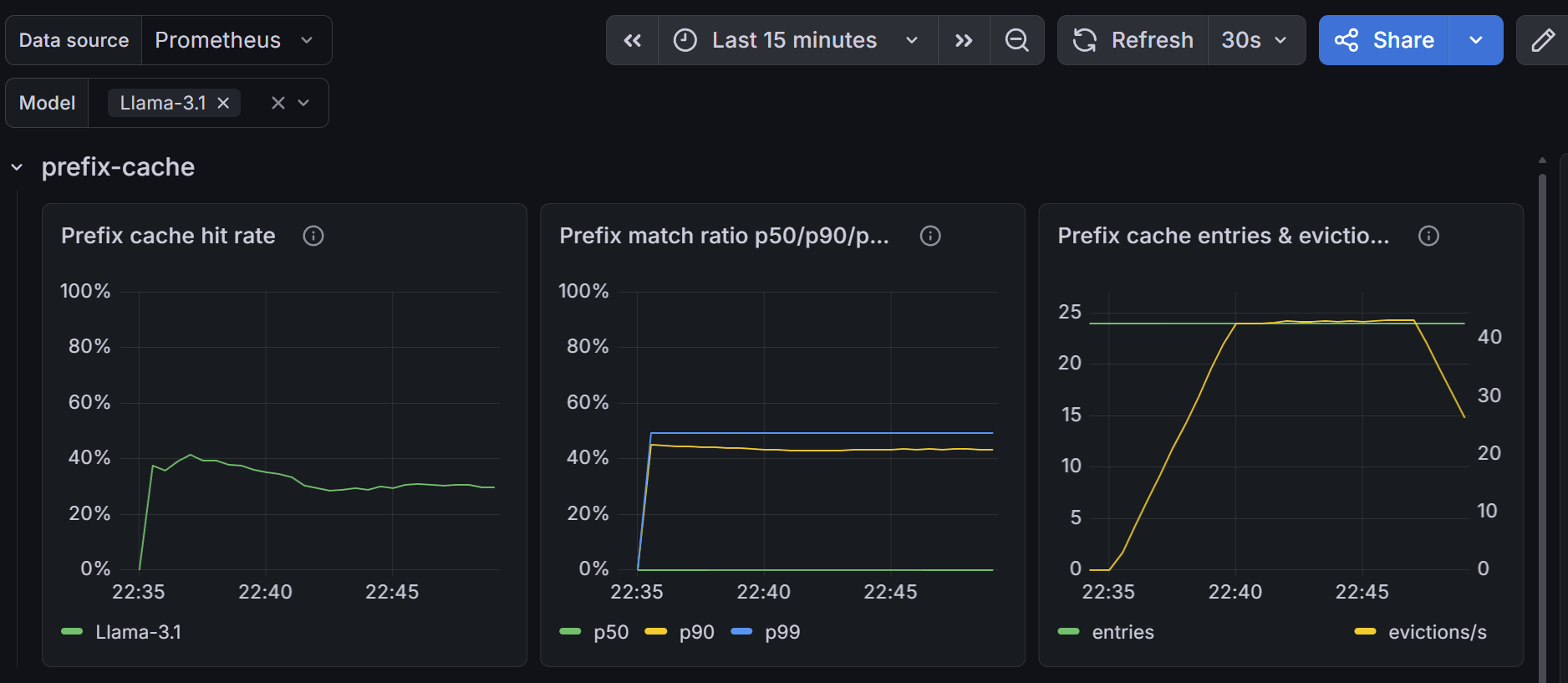
The score-plugin dashboard at examples/observability/kthena-router-score-plugins-dashboard.json has a prefix-cache row with three panels: Prefix cache hit rate, the share of match attempts with at least one matching block; Prefix match ratio p50/p90/p99; and Prefix cache entries & eviction rate. See Router Observability for how to import it.
3. Check Per-Pod Scores in the Router Logs
When the router runs with --v=4, the scheduler logs every score plugin's result for each scored request:
kubectl logs deployment/kthena-router -n <namespace> | grep -A5 "ScorePlugin: prefix-cache"
The output looks like this, with the log prefix trimmed:
ScorePlugin: prefix-cache
Pod: default/my-model-0, Score: 100
Pod: default/my-model-1, Score: 0
This log level is verbose; lower it again after debugging.
4. Send Test Requests
Send the same request twice:
curl http://<router-address>/v1/chat/completions \
  -H "Content-Type: application/json" \
  -d '{
    "model": "<model-name>",
    "messages": [
      {"role": "system", "content": "You are a support assistant for Kthena. Answer briefly and include a link to the documentation when possible."},
      {"role": "user", "content": "How do I enable the prefix-cache plugin?"}
    ]
  }'
On the first request, every pod's prefix-cache score is 0 because nothing is recorded yet. On the second, with a single router replica, the pod that served the first request scores 100. The request still goes to the pod with the highest total score, so a busy pod can lose to an idle one.
If the ModelServer uses session sticky, send these requests without a session key. With the same key, the second request is pinned to the bound pod and logs no scores.
Troubleshooting
| Symptom | Possible Cause | Resolution |
|---|---|---|
Router does not start: score plugin "prefix-cache" must set a weight greater than 0 | The weight is 0 or missing in Score.enabled | Set a weight greater than 0, or remove the entry to disable the plugin |
| An argument change has no effect | The router was not restarted, or the argument name is misspelled and ignored | Restart the router with kubectl rollout restart deployment/kthena-router, and check the names against the table above |
Router log: Failed to unmarshal PrefixCacheArgs, using default values | The args block of prefix-cache cannot be parsed | Make sure all four arguments are integers |
| Match ratio is always 0 | Requests do not share a prefix, or per-request data such as a timestamp sits at the start of the prompt | Put shared content, such as the system prompt, first and per-request content after it |
| Match ratio is always 0 | Requests fail on the selected pod, so nothing is recorded | Check the router access logs for upstream errors |
| Match ratio is low but not 0 | The shared part is short compared with the rest of the prompt, so only a few blocks match | Expected; the ratio shows how much of the prompt the engine can reuse |
| Match ratio drops after a router restart or rollout | The cache lives in router memory and starts empty | Expected; it recovers as new requests are served |
| Match ratio is low with several router replicas | Each replica keeps its own cache | Expected with several replicas; use kvcache-aware for a view shared across replicas |
| Evictions grow steadily and the match ratio stays low | maxHashCacheSize is too small for the number of distinct prompts per pod | Raise maxHashCacheSize |
| Match ratio is always close to 1, but requests spread across many pods | The shared prefix is longer than the prefix coverage, so all requests look the same | Raise maxBlocksToMatch so the coverage reaches past the shared part |
| High match ratio, but requests do not go to the matching pod | The plugin's weight is small next to the other score plugins, or the matching pod was filtered out as overloaded | Check per-pod scores at --v=4, and raise the prefix-cache weight if needed |
Later requests of a session log no prefix-cache score at --v=4 | Session sticky pinned them, so no score plugin ran | Expected; see Limitations |